

Prevent This: Someone Just Stole Your Kid's School Records
The Canvas breach is big. The real risk is the phishing that comes next.

If your child has done homework online in the past few years, there is a good chance they used Canvas. It is one of the most widely used learning management systems in the country and the dominant platform in higher education, where it holds nearly 40% market share. Teachers post assignments on it. Students submit work through it. Parents log in to check grades. And last week, hackers broke into Canvas, stealing student data and school information.
The hackers claim the breach affects 275 million users across roughly 9,000 schools. Instructure, the company that owns Canvas, has confirmed the breach but has not confirmed those numbers. What we know for certain is that the stolen data includes names, email addresses, student IDs, and private messages. If you are reading this newsletter and have a school aged child, there is a real probability that your family’s data is in that pile.
Here is the good news: your passwords, Social Security numbers, and credit card information were almost certainly not taken. Here is the bad news: what the hackers did get might be more useful to them than you think.
What Happened?
On April 30, 2026, Instructure (the company that owns Canvas) detected service disruptions on their platform. By May 1, their Chief Information Security Officer confirmed that a criminal threat actor had breached their network. On May 3, a hacking group called ShinyHunters claimed responsibility, posting a sample of the stolen data on their leak site and giving Instructure until May 6 to respond before publishing everything.
ShinyHunters claims to have stolen 3.65 terabytes of data. TechCrunch independently verified a sample of the stolen data, confirming records from at least two U.S. schools (one in Massachusetts, one in Tennessee) containing names, email addresses, phone numbers, and student messages. ShinyHunters describes the message archive as “several billion” private messages exchanged between students, teachers, and parents within the Canvas platform.
This is not the first time Instructure has been hit. In September 2025, the same group, ShinyHunters, compromised Instructure’s Salesforce instance through social engineering. That breach exposed customer support data. This time, the attackers accessed the Canvas platform itself. Two breaches by the same group in eight months.
Instructure has confirmed the breach and published guidance at their security incident page. A law firm has already opened a class action investigation.
The Good News (What Was Not Taken)
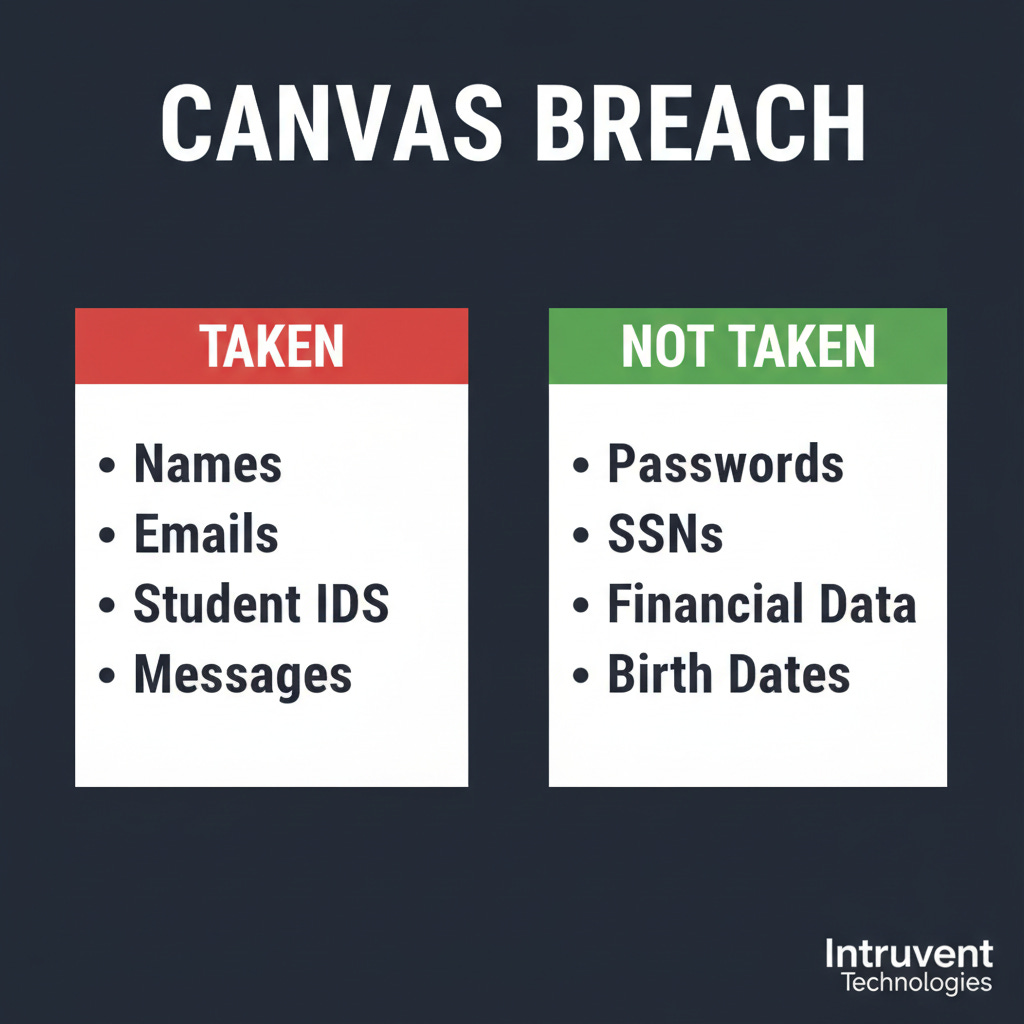
Before the panic sets in, here is what Instructure says the hackers did not get:
Passwords. Canvas did not store your child’s password in a way the attackers could access. Many school districts use what is called Single Sign-On (SSO), meaning students log into Canvas through their school’s Google or Microsoft account. Canvas never sees or stores that password. If your child logs into Canvas through a Google or Clever login page, their password was never in Canvas’s system to begin with. However, see the important caveat about student IDs below.
Social Security numbers. Schools store SSNs in their Student Information Systems (PowerSchool, Infinite Campus, etc.), not in Canvas. Canvas is a learning tool, not an enrollment database.
Financial information. Canvas does not process payments. If your school charges fees, that goes through a separate payment system.
Dates of birth. Also stored in the student information system, not Canvas.
So the most sensitive categories of personal data appear to be out of scope. That matters, and it is worth taking a breath over.
One Important Caveat: Student IDs Are More Than ID Numbers
Here is where the “good news” gets complicated. In many school districts, especially K-12, the student ID number is not just an identifier. It is the username. Your child might log into Canvas, PowerSchool, the lunch payment system, the library catalog, and the school’s Chromebook with the same student ID as their username.
And in a lot of districts, particularly for younger students, the password is something the district assigned using a predictable pattern: the child’s birthday, their initials plus a number, or (in the worst cases) the student ID itself with a simple modification. Teachers have to manage 25 to 30 kids who forget their passwords constantly, so many districts default to something simple and consistent.
That means the exposed student ID might effectively be half the login credentials for every system your child’s school district uses. Not because Canvas stored passwords, but because the student ID is the key that unlocks the front door, and the password behind that door might be guessable if an attacker knows the district’s pattern.
This does not mean every student is at risk. Districts that use SSO through Google or Microsoft, where the child has a unique password managed through the district’s identity system, are in a much better position. But districts that still rely on student-ID-as-username with simple assigned passwords should be treating this breach as a credential exposure event, not just a data exposure event.
The Bad News (What Was Taken, and Why It Matters)
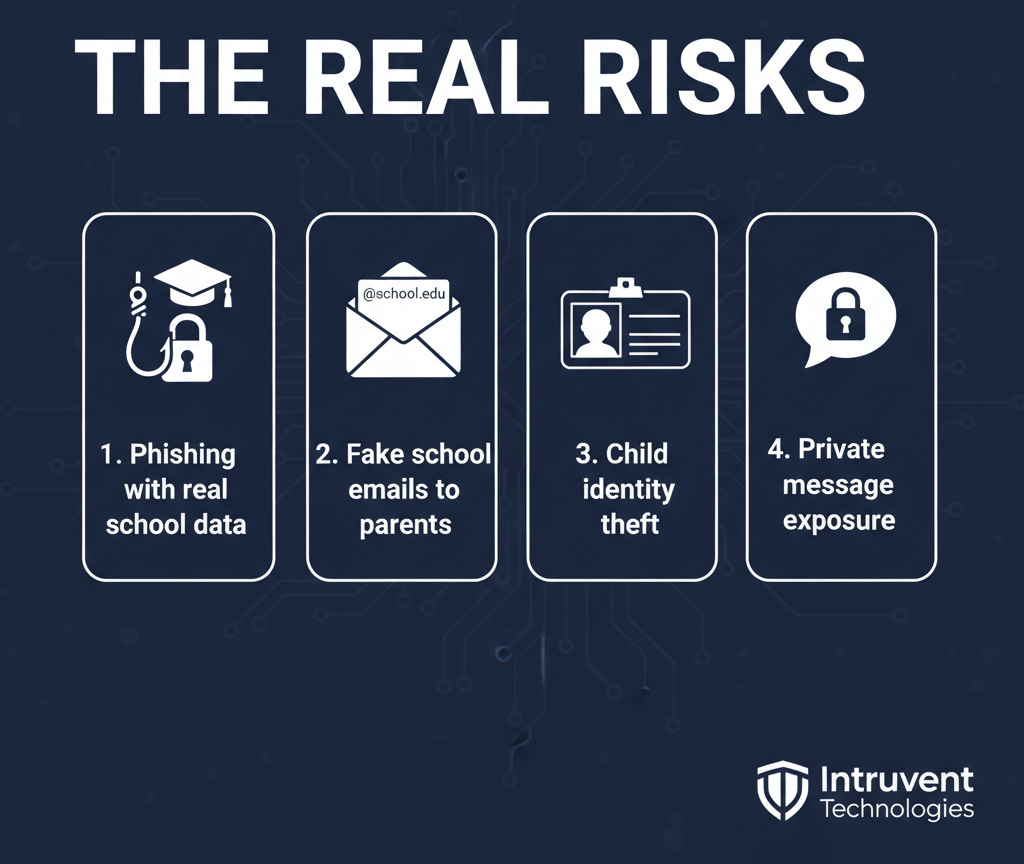
What the hackers did get is a different kind of valuable. Instructure confirmed the breach exposed:
Names (student, teacher, and parent/observer names)
Email addresses (institutional and, for parents, sometimes personal)
Student ID numbers
Private messages (conversations between students, teachers, and parents within Canvas)
On the surface, names and school email addresses might not sound alarming. But this data becomes dangerous when it is combined and used creatively. Here is what a motivated attacker can do with it:
1. Hyper-Targeted Phishing That Looks Like Your Child’s School
Imagine getting an email from what appears to be your child’s teacher: “Hi [your name], I noticed [your child’s name] hasn’t submitted their assignment for [actual class name]. Please log in to review their grade.” That email contains your real name, your child’s real name, and a real class. The link goes to a fake login page that steals your Google or Microsoft credentials.
This is the difference between a generic phishing email and one that references your actual life. Because the hackers have access to real messages, real class names, and real teacher names, they can build phishing emails that are nearly impossible to distinguish from legitimate school communications.
2. Social Engineering Parents
Armed with parent email addresses, student names, school names, and teacher names, a scammer can impersonate school administrators. “We are updating our payment system for school lunch accounts. Please verify your payment method.” The email comes with enough real details about your child’s school that it feels trustworthy.
3. Child Identity Theft (The Longer-Term Risk)
A child’s name and student ID number, combined with their school and approximate age, gives an identity thief a building block. To be clear: this data alone is not enough to open a credit card or take out a loan. That requires a Social Security number, which was not exposed in this breach. But it is one more piece in a puzzle that gets assembled over time as breaches accumulate, and children are attractive targets because nobody checks their credit for years.
Javelin Strategy & Research found that approximately 1 in 50 children (about 1.25 million kids) experience identity fraud each year in the United States, costing families roughly $1 billion annually. Most of that fraud involves someone the child knows, not a hacker with breach data. But for older students, especially college students whose names, school emails, and course information are now exposed alongside years of private messages, the risk profile is more direct. A college student’s identity is closer to fully formed and more immediately useful to a thief.
4. Private Message Exposure
Canvas stores every message sent between users on the platform. For college students, this could include conversations about academic struggles, accommodation requests, personal disclosures to advisors, or sensitive communications with professors. For younger students, the content may be less sensitive, but the principle remains: private conversations between children and their teachers were never meant to be public.
What Can You Do?
Step 1: Find Out If Your School Uses Canvas
If you are not sure, ask your school’s front office or check your child’s school website. Look for references to “Canvas,” “Instructure,” or a login link that goes to a .instructure.com domain. Canvas is used by roughly 4,000 K-12 districts and 5,000 colleges in the United States. Chances are reasonable that at least one school your family has interacted with uses it.
Step 2: Ask Your District How Your Child Logs In
This is the most important step and it takes one phone call or email. Contact your school’s front office or IT department and ask two questions:
“Does my child’s student ID serve as their username for any school systems?”
“Are student passwords assigned by the district using a standard pattern, or does each student set their own?”
If the answer to both is yes, the student IDs exposed in this breach are effectively half a set of login credentials. Ask the district to reset your child’s password across all systems and, if possible, move to a unique password that does not follow a predictable pattern. If your district uses Google or Microsoft SSO with individual passwords, you are in better shape, but change that password anyway.
Step 3: Change the Passwords Around Canvas
Even if Canvas passwords were not directly compromised, secure the accounts connected to your child’s school life:
Your child’s school Google or Microsoft account. If their school uses SSO, this is the password that unlocks everything. Change it.
Your parent portal account for your school district (PowerSchool, Infinite Campus, etc.). Change it.
Your personal email if it is the same one linked to your parent/observer Canvas account.
If any of these passwords are reused across other sites, change those too.
Step 4: If the Student is 18+, Consider Freezing Credit (Good Practice, Not Urgent)
This breach did not expose Social Security numbers, so it does not give attackers what they need to open accounts in your child’s name right now. But a credit freeze is one of the best long-term protections against child identity theft from any source, and it is free. If you have not done this already, this is a reasonable time to take care of it.
For college students (18+): This is more directly relevant. Their identities are more fully formed and more immediately useful to a thief. They should freeze their own credit at all three bureaus:
Equifax: equifax.com/personal/credit-report-services/credit-freeze
Experian: experian.com/freeze/center.html
TransUnion: transunion.com/credit-freeze
Step 5: Watch for Phishing Emails From “School”
For the next several months, treat any email that appears to come from your child’s school with extra caution, especially if it asks you to click a link, log in, update payment information, or download an attachment. If something looks off, call the school directly using the phone number from their website, not from the email.
This is especially true for end-of-year emails about report cards, summer programs, or registration for next year. Scammers will time their phishing to match the school calendar.
Step 6: Talk to Your Kids (Especially Teens and College Students)
Older students need to know that their Canvas messages may have been exposed. If your college student sent sensitive messages through Canvas (academic concerns, personal issues, accommodation requests), they should be aware that this information could surface. They should also watch for phishing emails impersonating their university and avoid clicking links in any email that references their courses by name.
A Note on FERPA
Student education records are protected under FERPA (the Family Educational Rights and Privacy Act). When those records are breached, your child’s school district holds the notification obligation, not Instructure. If your school uses Canvas, your district should be communicating with you about this breach and what they are doing about it. If they have not, ask them. You have a right to know.
The Bottom Line
The Canvas breach is real, large, and affects a population that deserves extra protection: children. The good news is that the most dangerous data categories (passwords, SSNs, financial info) were not part of it. The bad news is that the data that was taken (names, emails, student IDs, and private messages) gives attackers the raw material for highly convincing phishing campaigns targeting families.
Three things to do this week:
Be skeptical of school emails that ask you to click, log in, or pay, especially if they reference your child by name and class. That specificity is exactly what this breach enables. Call the school directly to verify.
Ask your district if your child’s student ID is used as a username, and whether passwords follow a standard pattern. If yes, request a password reset.
Change the passwords on your child’s school Google/Microsoft account and your parent portal.
This breach hit the system our kids use every single day. Share this with other parents at your school. They need to know.
Sources
BleepingComputer: Instructure confirms data breach, ShinyHunters claims attack(May 2026)
TechCrunch: Hackers steal students’ data during breach at Instructure (May 2026)
SecurityWeek: Edtech firm Instructure discloses data breach (May 2026)
FOX 9: Canvas data breach, hackers claim info of 275 million users (May 2026)
Javelin Strategy & Research: Child Identity Fraud Study (2021)
Prevent This is a weekly cybersecurity newsletter from Intruvent Technologies. Each week, we break down one cyber threat in plain language and give you the tools to protect yourself and the people you care about. For any feedback or if your company is experiencing a breach and you need help, contact us at contact@intruvent.com