

Prevent This: Social Media's Open Door — Part 4: The Highlight Reel
Instagram is the number one picture sharing and chat platform in the United States. Here's what you need to know to keep your account and your family safe while using the platform

Welcome New Readers
Welcome to new readers! If this is your first time here, here’s how this works. Prevent This publishes weekly and covers a specific type of cyber attack, breaks down how it works, and gives you practical steps to protect yourself. Every other week, we also publish Intruvent Edge, our cyber threat intelligence newsletter that takes a deep dive into a specific threat actor, complete with hunting logic and actionable intelligence.
From the Intruvent Intel Desk
Our latest analysis on Iranian cyber threats is live. If you missed it, check out our Iran Cyber Threat overview at our website. You can find the most recent Iran Conflict SITREP here.
A big thank you to Shane Shook, advisor to Intruvent and someone whose insight consistently makes our intelligence better. Shane recently shared research on Iranian threat activity that added depth to our own analysis, and we’ve incorporated his findings into our ongoing coverage. Shane also recently published a piece at the National Security Institute regarding the new US Cyber Strategy which can be found here, and is well worth the read.
Now, on to this week’s topic...
What is Instagram?

Instagram is a photo and video sharing platform owned by Meta (formerly Facebook). With over 2 billion monthly active users, Instagram started as a simple photo filter app. It has evolved into a sprawling ecosystem of Stories, Reels, DMs, shopping, and live streaming. It is the second most popular social media app among U.S. teens behind YouTube, with 61% of 13 to 17 year olds using it regularly and 47% opening it daily.
If your teenager has a phone, there is a better than coin-flip chance they are on Instagram right now.
What Happened?
In September 2024, Meta announced Instagram Teen Accounts with fanfare. Built-in protections. Private by default. Messaging restrictions. Content filters. Adam Mosseri, Instagram’s head, wrote that Teen Accounts were “designed to give parents peace of mind.”
Researchers tested that claim. The results were not encouraging.
A joint study by ParentsTogether Action, the HEAT Initiative, and Design It for Us found that nearly 60% of teens aged 13 to 15 still encountered unsafe content and unwanted messages on Instagram within a six-month window after Teen Accounts launched. Nearly 60% of kids who received unwanted messages said those messages came from users they believe to be adults. And roughly 40% of those unwanted messages were from people trying to start a sexual or romantic relationship with the teen.
A separate independent review of Meta’s 47 stated safety features found that only eight worked as advertised. Nine others reduced harm but had limitations. Thirty features, 64% of the total, were either ineffective or no longer available.
It was a good start, but not a full solution…
Researchers found that adults could still message teenagers who did not follow them. Instagram’s algorithm continued recommending sexual content, violent content, and self-harm material to teen accounts despite filters that were supposed to block it. They also found evidence that children under 13 were actively using the platform and that the algorithm was incentivizing their engagement.
In October 2025, Meta introduced PG-13 content standards for teen users, promising to filter content the way movie ratings filter what kids see in theaters. Posts showing marijuana use, alcohol content, and extreme stunts would be hidden from most teen accounts. Parents could also opt into a stricter “Limited Content” mode.
The safety measures keep coming. The underlying problems keep staying.
Why Should You Care?
Because Instagram is ground zero for teen sextortion in America, and the numbers are staggering.
A joint report from the National Center for Missing and Exploited Children (NCMEC) and Thorn (child safety advocacy experts) analyzed sextortion data from 2020 to 2023. Instagram was the most mentioned platform in financial sextortion reports. In cases where an offender threatened to distribute intimate imagery online, 81% of threats named Instagram as the distribution platform. When images were actually distributed, 60% of the time it happened on Instagram. And in 45% of reports that identified where offenders first made contact with victims, that first contact happened on Instagram.
The typical victim is not who most parents picture. Ninety percent of financial sextortion victims are boys between the ages of 14 and 17. They are catfished by someone posing as a peer, persuaded to share explicit images, and then blackmailed. The rise of financial sextortion has been linked to organized crime networks in Nigeria and Cote d’Ivoire, where the tactic is promoted as a way to get rich fast.
A February 2026 study published in the Journal of Adolescent Health surveyed 3,466 U.S. teens and found that nearly 1 in 3 had received a sext and almost 1 in 4 had sent one. Those numbers are up sharply from 2019. Among teens who sent a sext, nearly half reported their image was shared without their permission. And half of teens who sent a sext reported being targeted with sextortion afterward.
Teens who sexted someone outside of a current romantic relationship were 13 times more likely to have their images shared without consent and five times more likely to experience sextortion.
This is not hypothetical risk. This is happening to kids in your neighborhood, at your school, right now.
How Does This Work?
Instagram’s risk profile for teens breaks down into four categories.
The Algorithm Problem
Instagram’s recommendation engine is designed to maximize engagement. For teens, that means the algorithm learns what gets a reaction and serves more of it. Internal Meta research leaked in 2021 showed that Instagram’s own researchers knew the platform was contributing to body image issues and mental health harm, particularly for teenage girls. Despite years of promises, independent researchers continue to find that the algorithm recommends eating disorder content, self-harm material, and sexually suggestive posts to teen accounts. The algorithm does not care about your child’s wellbeing. It cares about keeping them scrolling.
The “Private Account” Myth
Many parents believe that setting their teen’s account to private solves the problem. It helps, but it does not solve it. A private account means new followers need approval. It does not prevent your teen from accepting a follow request from a stranger who looks like a peer. It does not prevent screenshots of their content by approved followers. It does not prevent their profile photo, bio, and username from being visible to everyone. And it does not prevent them from being found through friends’ tagged photos, school hashtags, or location tags. A private account is a speed bump, not a wall.
The Direct Message (DM) Pipeline
Even with messaging restrictions, teens can still receive messages from anyone they follow or are connected to. Predators and sextortion operators know this. They create accounts that look like peers, engage with the same content, follow friends of the target, and eventually get followed back. Once that connection is made, the messaging restrictions disappear. The conversation often moves quickly to Snapchat or another platform where messages are harder to trace.
The Finsta Problem
Finstas, or “fake Instagrams,” are secondary accounts teens create specifically to post content they do not want parents or their wider social circle to see. These accounts typically have no parental supervision enabled, use a different email address, and exist entirely outside whatever safety guardrails parents have set up on the primary account. Meta’s own data suggests this is widespread, and Teen Account protections can be bypassed by anyone willing to create a new account with a false birthdate.
What Can You Do?
Step 1: Set Up Parental Supervision Through Family Center
Meta’s Family Center is the hub for parental oversight on Instagram. It is not perfect, but it is the foundation.
1. Open Instagram and tap your profile icon (bottom right)
2. Tap the menu (☰) in the top right, then tap “Settings and privacy”
3. Scroll to “Supervision” under the “For families” section and tap “Family Center”
4. Follow the prompts to send a supervision invitation to your teen’s account
5. Your teen must accept the invitation from their device
Once connected, you can see who your teen follows and who follows them (but not their messages), set daily time limits from 15 minutes to 2 hours, schedule break times and sleep mode hours, and receive notifications if your teen reports content.
Important: teens under 16 need your permission to change default safety settings to be less strict. Teens 16 and 17 can change settings on their own. And your teen can remove supervision at any time. Have a conversation about why it stays on.
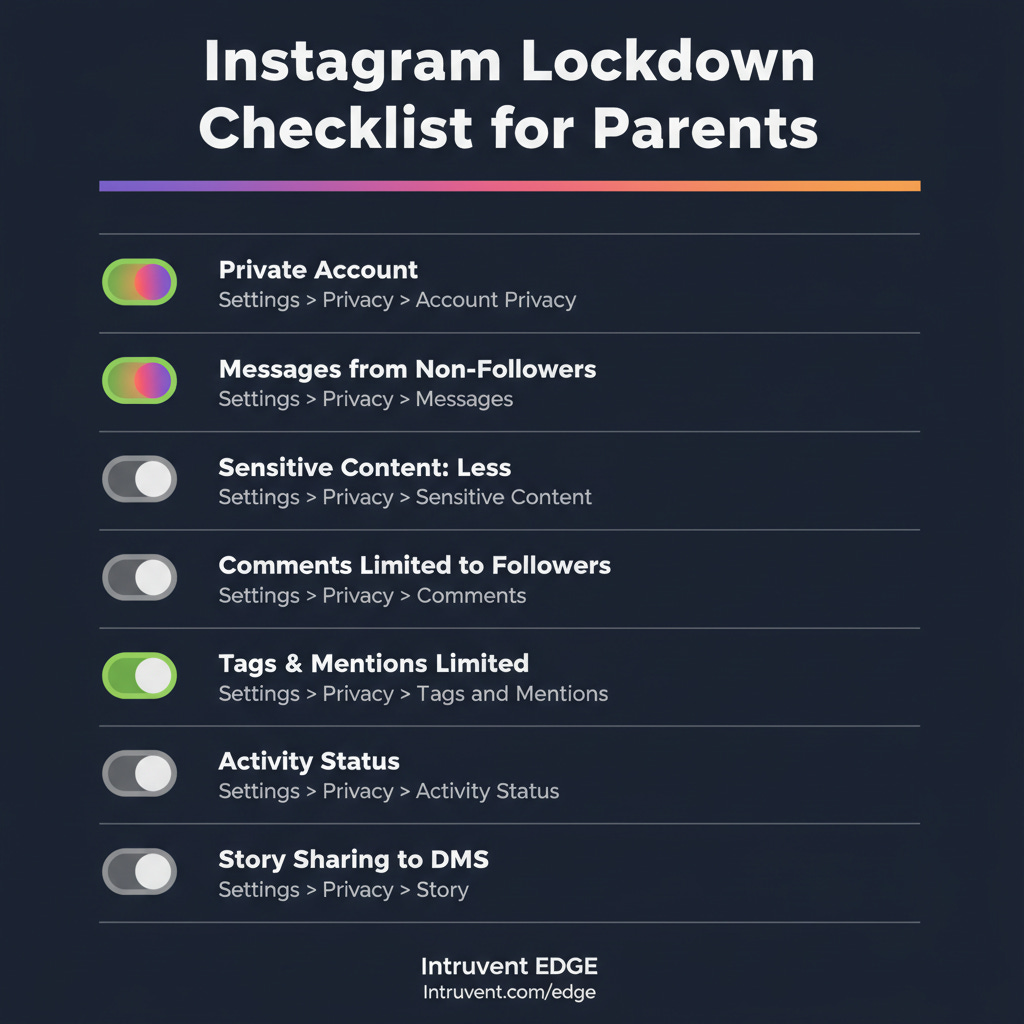
Step 2: Verify Teen Account Settings
If your teen is under 16, these should already be the defaults. Verify them anyway.
Account Privacy: Profile > Menu (☰) > Settings and privacy > Account privacy > Private Account should be ON.
Messaging: Profile > Menu (☰) > Settings and privacy > Messages and story replies > set to “Only people you follow.” This prevents strangers from sliding into DMs. Confirm this has not been changed.
Sensitive Content Control: Profile > Menu (☰) > Settings and privacy > Content preferences > Sensitive content > Set to “Less.” This is the most restrictive option and limits what appears in Explore and Reels. For the updated PG-13 settings, parents can also enable “Limited Content” mode here for even stricter filtering.
Comments: Profile > Menu (☰) > Settings and privacy > Comments > Select “People you follow” to limit who can comment on posts.
Tags and Mentions: Profile > Menu (☰) > Settings and privacy > Tags and mentions > Select “People you follow” or “No one.”
Activity Status: Profile > Menu (☰) > Settings and privacy > Activity status (under “How others can interact with you”) > Toggle OFF. This prevents others from seeing when your teen was last active.
Story Sharing: Profile > Menu (☰) > Settings and privacy > Story > Disable “Allow sharing to messages.” This prevents your teen’s Stories from being forwarded via DM.
Step 3: Lock Down Location and Data Exposure
Remove location from posts. Before posting, tap the location field and remove it. This is a phone-level setting, not inside Instagram.
On iPhone: go to your phone’s Settings > Privacy & Security > Location Services > Instagram > Set to “Never.”
On Android: phone Settings > Location > App permissions > Instagram > Deny or “Only while using the app.” GPS coordinates embedded in photos are metadata gold for anyone building a profile on your child.
Disable contact syncing. Profile > Menu (☰) > Settings and privacy > Accounts Center > Your information and permissions > Upload contacts > Instagram > Toggle OFF. This prevents Instagram from mapping your teen’s entire contact list and suggesting connections to people they may know in real life but should not be connected to online.
Review connected apps. Profile > Menu (☰) > Settings and privacy > Accounts Center > Your information and permissions > Apps and websites. Remove any third-party apps your teen has connected to Instagram. These often have broad permissions to access profile data, follower lists, and messages.
Step 4: Have the Conversations That Matter
Settings are guardrails. Conversations are the actual protection.
About sextortion: “There are criminals who specifically target teenagers on Instagram. They pretend to be your age, build a friendship, and then pressure you into sharing photos. Then they threaten to send those photos to everyone you know unless you pay them. This happens to smart kids every single day. If it ever happens to you, come to me immediately. You will not be in trouble. The person doing it is the criminal.” Direct them to NCMEC’s CyberTipline at 1-800-843-5678 or report.cybertip.org.
About the algorithm: “Instagram is designed to show you more of whatever gets a reaction from you. If you pause on something that makes you feel bad about yourself, it will show you more of it. That is not a reflection of reality. It is a machine optimizing for your attention. If your feed starts making you feel worse instead of better, you can reset your recommendations in Settings and privacy > Content preferences > Reset suggested content.”
About finstas: “If you feel like you need a secret account to be yourself, let’s talk about why. I would rather know about it and help you navigate it than find out after something goes wrong.”
About follower requests: “If someone you have never met in real life sends you a follow request, do not accept it. If they have mutual friends, ask those friends if they actually know the person offline. Bots and fake accounts copy real people’s photos to look legitimate.”
Step 5: Use Your Phone’s Built-In Tools
Instagram’s controls have gaps. Supplement with operating system level tools.
Apple Screen Time (iPhone): Settings > Screen Time > App Limits. Set a daily limit for Instagram. Enable “Prevent Changes” under Content & Privacy Restrictions so your teen cannot override it.
Google Family Link (Android): Set daily app limits, approve or block apps, and monitor usage. These controls operate at the system level, so they cannot be bypassed from within Instagram.
What’s Next on Their Phones: The Apps You Should Know About
This is the final installment of Social Media’s Open Door. We have covered Snapchat, TikTok, Facebook, and now Instagram. But new platforms are showing up on your kids’ phones all the time. Here are three to watch right now.
Coverstar is marketed as the “safe TikTok alternative.” No DMs, moderated content, and community guidelines focused on positivity. It sounds great on paper. In practice, profiles are public by default, age verification is easy to bypass by simply deleting and recreating an account with a fake birthdate, the app serves inappropriate advertisements alongside kid content, and a virtual currency system called Starcoins lets followers send real-money gifts during livestreams. A former FBI agent has publicly flagged safety concerns. The user base is almost entirely tween girls dancing on camera for public audiences. The app markets itself with the tagline “Go viral, not toxic.” Parenting advocacy group Brave Parenting does not recommend it, noting that despite the safety branding, the platform still promotes comparison, competition, and objectification among children. If your child is using Coverstar, set their profile to private, talk about the difference between creativity and performing for strangers, and monitor for adults attempting to move conversations to other platforms through public comments.
Lemon8 is owned by ByteDance, the same Chinese company behind TikTok. Think Instagram meets Pinterest: lifestyle content, curated aesthetics, recipes, fashion, and beauty tips. It uses the same algorithmic approach as TikTok to surface content, and it carries the same data privacy concerns. When TikTok was briefly banned in January 2025, Lemon8 disappeared from app stores too because it falls under the same divest-or-ban legislation. ByteDance has been actively paying TikTok influencers to promote Lemon8 as a “backup app.” If you had concerns about TikTok’s data practices, those concerns apply here.
The common thread across every platform in this series is the same: default settings are not enough, privacy controls have gaps, and the most effective protection is a parent who understands how the app works and talks about it regularly.
The Bottom Line
Instagram is the most popular image-sharing platform among American teenagers and the number one platform for sextortion. Meta continues to announce new safety features, and independent researchers continue to find that most of those features do not work as advertised. Teen Accounts are a step in the right direction, but they are not a solution.
Set up Family Center supervision. Verify every default setting yourself. Lock down location services and contact syncing. Have the hard conversations about sextortion, the algorithm, and secret accounts. Supplement with your phone’s built-in parental controls.
And remember the lesson from this entire series: every app on your kid’s phone is an unlocked door. Your job is to know which doors are open, teach your kids how to recognize who is standing on the other side, and make sure they know they can always come to you when something feels wrong.
Your kid’s phone is a gateway to more than just their friends. It connects to your home network, your family’s location data, and in some cases, your workplace systems. The threat does not stop at their device. But neither does your ability to protect them.
Thanks for reading Intruvent Edge! This post is public so feel free to share it.
This is the final installment of the Prevent This: Social Media’s Open Door series. Catch up on the full series: Part 1 — Snapchat, Part 2 — TikTok, Part 3 — Facebook.
Research Sources: NCMEC/Thorn Financial Sextortion Report (2024), ParentsTogether Action/HEAT Initiative/Design It For Us Instagram Teen Accounts Study (2025), TIME Magazine Instagram Investigation (October 2025), Journal of Adolescent Health — Patchin & Hinduja Sextortion Study (February 2026), Florida Atlantic University Sexting Research (2026), Pew Research Center Teens & Social Media (December 2025), Meta Family Center Documentation, Instagram Teen Accounts Announcement (September 2024), ABC News PG-13 Content Standards Report (October 2025), ConnectSafely Parent’s Guide to Instagram (2025), Brave Parenting Coverstar Guide (2026), Bark Technologies App Reviews, Gabb Noplace Safety Review (2024)
Last Updated: March 17, 2026