

Prevent This: Social Media's Open Door, Part 3: The Everything App
Facebook was the original Social Media phenomenon. From Cambridge Analytica to AI Training Data: A Parent and Business Leader's Guide to Facebook's Security Risks and How to Lock It Down.

What is Facebook?
Facebook is the world’s largest social media platform, owned by Meta Platforms, Inc. With over 3 billion monthly active users, it tries to be your number one social stop on the Internet. It’s a marketplace, a news feed, a business directory, a messaging platform, a dating app, and increasingly, an AI training dataset, all rolled into one account tied to your real name, your real face, and likely your real phone number.
Unlike Snapchat (built for teenagers) or TikTok (built for entertainment), Facebook was engineered from the start around identity. Your actual name. Your actual network. That design choice is both its power and its most significant security liability.
The Good
Facebook has real value. For many families, it’s how grandparents stay connected with grandchildren. For small businesses, it’s often their primary online presence. For community organizations, nonprofits, and local news, it’s become the town square. Facebook Groups and Marketplace are genuinely useful tools, and Facebook’s infrastructure for staying in touch with people across time zones and generations is unmatched.
Meta has also invested heavily in security infrastructure over the years. It employs thousands of security engineers, runs a robust bug bounty program, and offers two-factor authentication, login alerts, and account recovery tools that are, when actually turned on, quite effective.
But the gap between what Facebook can do to protect you and what it does by default is wide. And the company’s history with your data deserves an honest look before we get to the settings.
The Track Record: A Pattern Worth Understanding
Facebook has been fined, sued, and hauled before Congress more times than any other technology company in history. Here are some notable instances:
The Cambridge Analytica Scandal remains the most significant data privacy incident in social media history. In 2014, a psychology researcher named Aleksandr Kogan built a quiz app that collected data not only from the 270,000 people who took it, but through a loophole in Facebook’s API, from all of their friends as well. The result: personal data from approximately 87 million Facebook users was harvested and handed to Cambridge Analytica, a political consulting firm, without those users ever knowing. The data was used to build psychological profiles for targeted political advertising.
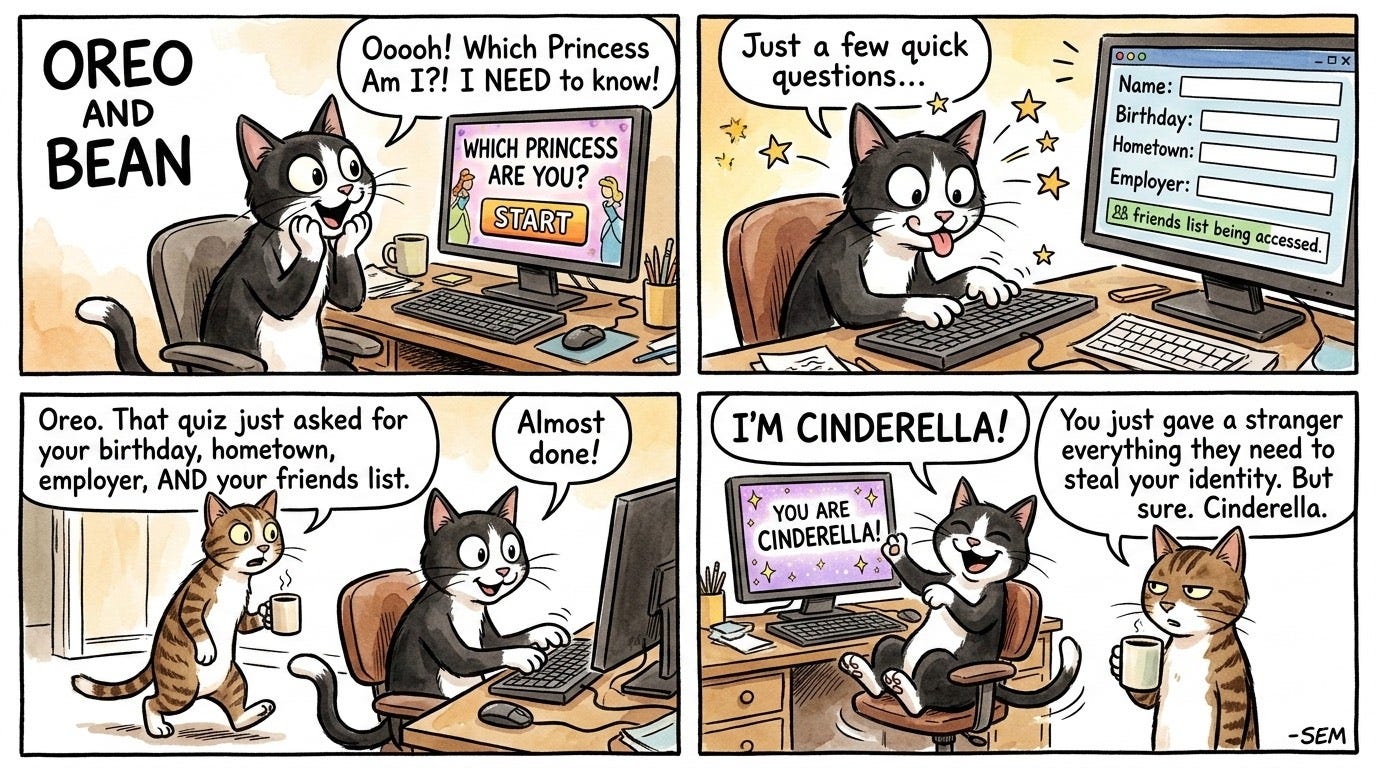
Facebook knew about it in 2015 and asked Cambridge Analytica to delete the data. They didn’t. The public didn’t find out until 2018.
The FTC fined Facebook $5 billion in 2019 to settle the investigation into the incident, according to Wikipedia. As recently as November 2025, Facebook executives and a group of Meta shareholders agreed to a $190 million settlement in a lawsuit alleging that leadership prioritized executives over the company’s fiduciary responsibility to investors. And in July 2025, an $8 billion class action lawsuit against Meta Founder Mark Zuckerberg and other Meta board members went to trial according to CBC News. The legal fallout from that single incident is still unfolding, a decade later.
The Cambridge Analytica scandal mattered because it exposed something most users didn’t understand: your Facebook data doesn’t stay between you and Facebook. Every app you’ve ever connected to your account, every quiz you’ve taken, every “Login with Facebook” button you’ve ever clicked, those are all doors. And Facebook’s history shows those doors haven’t always had locks.
The 2021 Data Breach is less famous but directly relevant. Phone numbers, full names, birth dates, email addresses, and location data from 533 million Facebook users were published in a hacker forum. If you had a Facebook account before 2019, your phone number was likely in that dataset. Attackers routinely reuse data from breaches like this for targeted phishing, profile-based extortion, credential stuffing, and SIM swap attacks that can escalate from social media into banking and email account takeovers (source: ExpressVPN).
AI Training is the newest front. Facebook uses public data for AI training, which has raised privacy concerns (source: All Things Secured). In May 2025, Meta confirmed it was using public posts, photos, and comments from Facebook and Instagram to train its AI models, including content posted by users going back years. The opt-out exists, but it’s buried and doesn’t apply to data already used.
Why Parents Should Care
Facebook’s minimum age is 13, but a 2011 study found that 76% of parents reported their child joined Facebook younger than 13 according to Wikipedia. The platform removes roughly 20,000 underage accounts per day, which tells you both that the problem is massive and that they are trying to handle enforcement of their rules.
For teenagers on the platform, the risks aren’t hypothetical. Predators use Facebook’s search features and public group memberships to identify and target minors. Scammers impersonate classmates or run fake marketplace listings targeting teens. And the “real name” requirement that makes Facebook feel safer than anonymous platforms actually makes it easier for bad actors to build convincing fake profiles that exploit your family’s trust network.
The account cloning attack is particularly relevant for parents: a criminal copies your profile photo and name, creates a new account, and then sends friend requests to everyone on your list, your kids included. Once connected, they have access to your network and a credible-looking identity to run scams from.
Why Business Leaders Should Care Specifically
Facebook offers “Login with Facebook” as an authentication method for any business system or application. This means that employees or customers can use their Facebook login credentials to authenticate to 3rd party applications. But, the security of that system is now tied to the security of each employee’s personal Facebook account. Many organizations don’t realize they’ve accepted that risk.
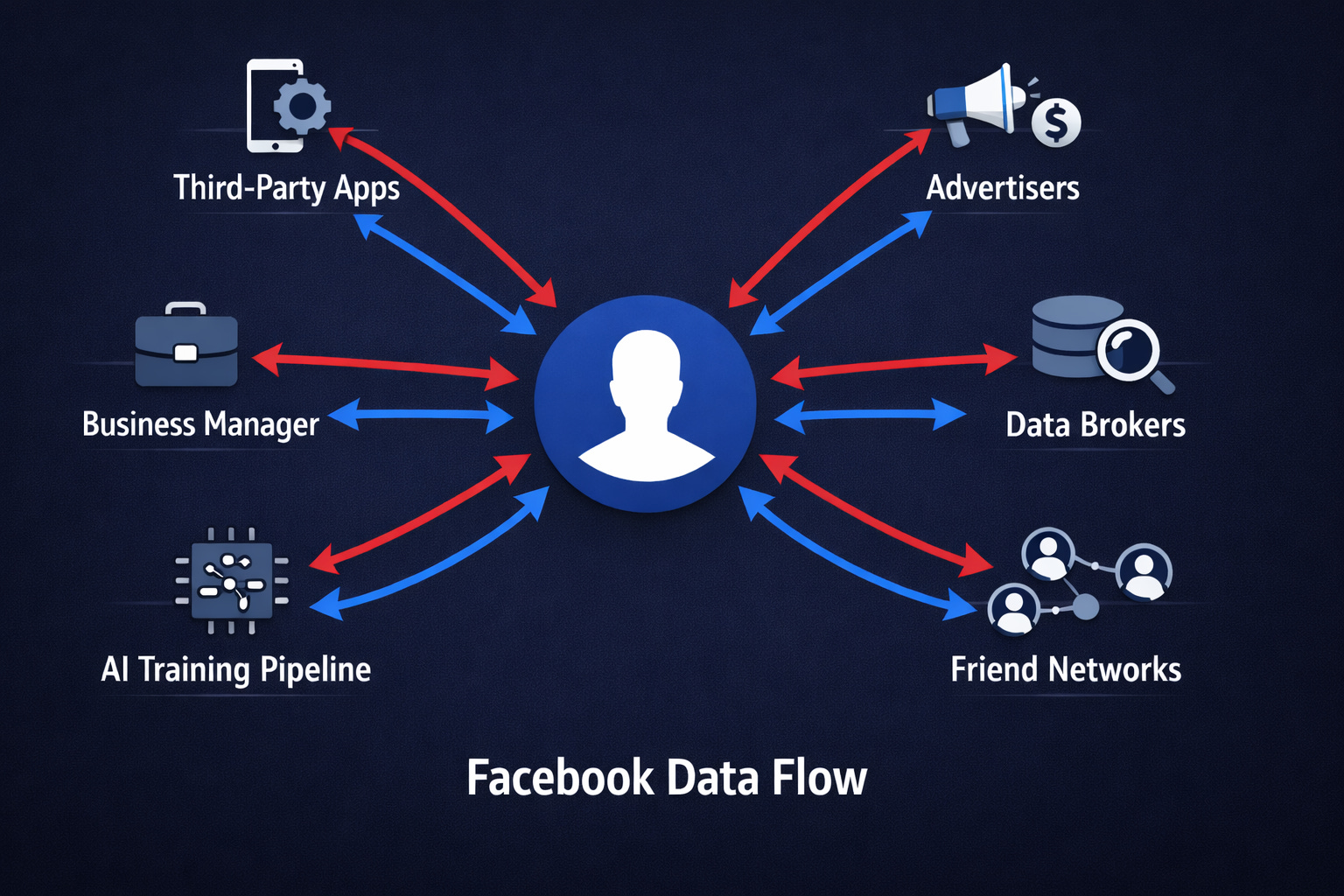
Beyond that, business pages and Facebook Business Manager accounts are high-value targets. Hackers who gain access to your Business Manager can run paid ad campaigns on your credit card, impersonate your brand, access customer data in connected apps, and lock you out of your own page. These attacks are common, sophisticated, and often executed through phishing emails that look exactly like official Meta security alerts.
Employee social engineering is another vector. Attackers research leadership teams on Facebook to build convincing pretexts, the same technique that powers the vishing attacks covered in an earlier issue of this newsletter. A company org chart can be reconstructed from public Facebook profiles in under an hour.
How to Make Facebook (More) Secure
Fair warning: Meta updates its interface frequently, and settings move. If you can’t find something exactly where described, use the search function within Settings to locate it.
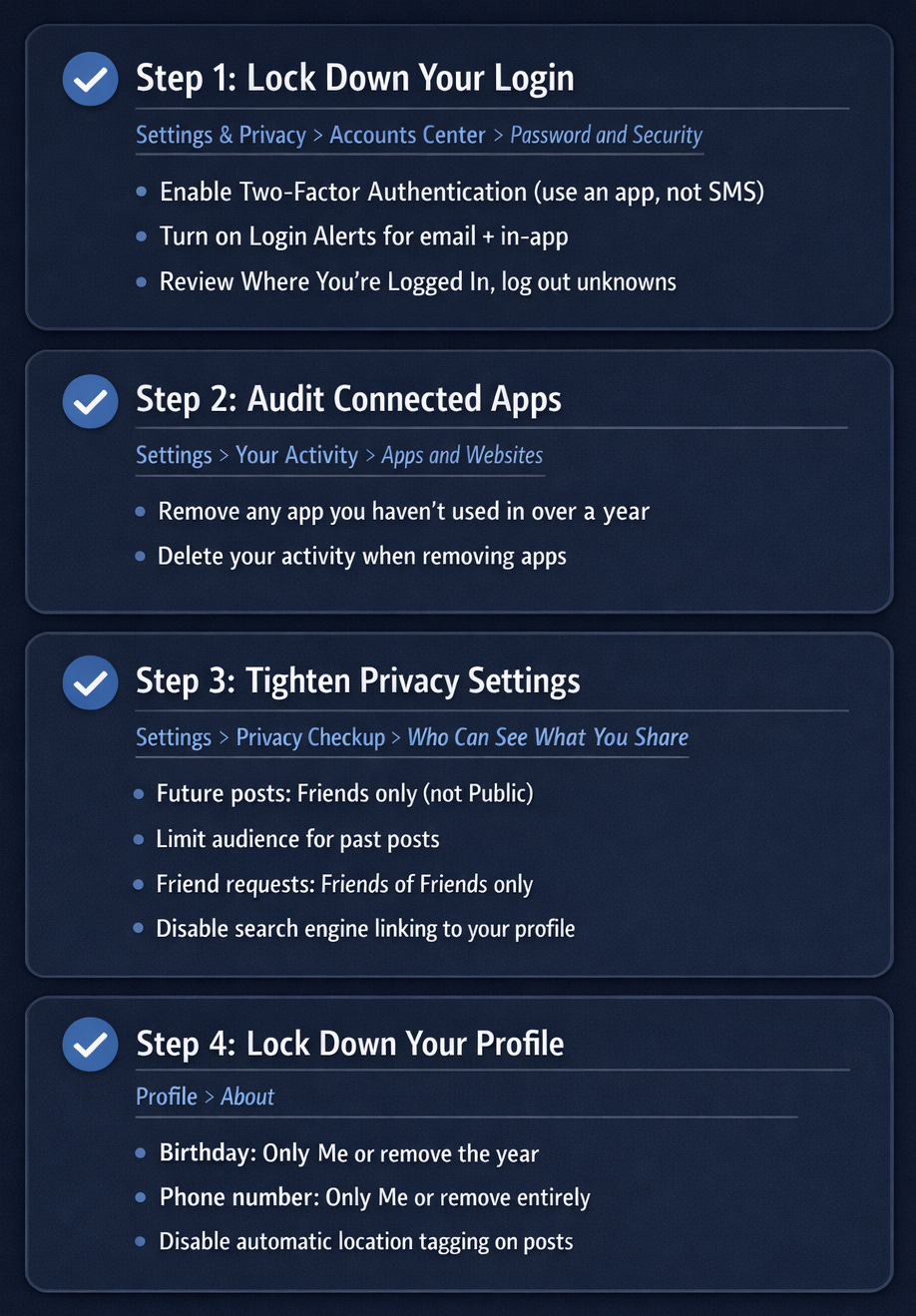
Here’s a sharable cheat sheet, followed by the long form instructions:
For Personal Accounts
Step 1: Lock Down Your Login
Enable Two-Factor Authentication (2FA). This is non-negotiable
Go to Settings & Privacy > Settings > Accounts Center > Password and Security > Two-Factor Authentication
Choose an authenticator app (Google Authenticator, Authy, or similar) rather than SMS. SMS codes can be intercepted via SIM swap attacks
Turn on Login Alerts
In the same Password and Security section, enable Get alerts about unrecognized logins
Set alerts to both email and in-app notifications
Review Active Sessions
Under Password and Security > Where You’re Logged In, review every active session
Log out of anything you don’t recognize immediately
Step 2: Audit Connected Apps — This Is the Cambridge Analytica Fix
This is the single most overlooked security action on Facebook, and it’s where the Cambridge Analytica-style risk lives
Go to Settings > Your Activity > Apps and Websites
Review everything listed. Be ruthless. If you haven’t used an app in the past year, remove it
When you remove an app, also select the option to delete your activity on that app
Pay special attention to apps that have access to your friends list or your profile information
Do this every six months. Apps change ownership, get acquired by data brokers, or simply go dark while retaining the data access they were granted years ago
Step 3: Tighten Your Privacy Settings
Settings > Privacy Checkup > Who Can See What You Share
Who can see your future posts? Set to Friends (not Public)
Limit the audience for past posts? Run this once to retroactively restrict everything you’ve shared publicly
Who can see the people, Pages, and lists you follow? Set to Only me
Settings > Privacy Checkup > How People Find and Contact You
Who can send you friend requests? Set to Friends of Friends
Who can look you up using your email address? Set to Only me
Who can look you up using your phone number? Set to Only me
Do you want search engines outside of Facebook to link to your profile? Set to No
Step 4: Lock Down Your Profile Information
Go to your Profile > About and review every field
Birthday: set to Only Me or remove the year entirely (birthdates are commonly used in identity theft)
Phone number: Only Me, or remove it from your profile entirely
Workplace and hometown: consider whether this information needs to be public
Check-ins and location: disable automatic location tagging on posts
Step 5: Opt Out of AI Training
This option has (apparently) been removed in the latest versions of the Facebook Application.
For Parents of Teens (Under 18)
Use Supervision Tools.
Facebook has a Supervision feature for teens under 18, accessible through Settings > Family Center on a parent account
This lets you see who your teen is connected with and receive activity updates
Similar to TikTok’s Family Pairing, set it up even if your teen pushes back
Review Their “About” Section Together.
Walk through every piece of information your teen has posted publicly
No phone numbers, no school name visible to non-friends, no location
The rule: if you wouldn’t put it on a flyer stapled to a telephone pole, it shouldn’t be public
Have the “Stranger” Conversation for Social Media.
The threat isn’t a stranger in a van. It’s a person who sent a friend request that looked like it came from someone they know.
Teach them: if someone they don’t recognize adds them, they don’t need to accept. Ever.
The platform makes it easy to accept because it suggests people. Suggestion is not endorsement.
Clone Attack Awareness.
Tell your teen: if they get a second friend request from someone already on their list, that’s a cloned account. Don’t accept it. Report it. Tell you.
For Business Pages and Business Manager
Secure Your Business Manager Account First.
Go to business.facebook.com > Business Settings > Security Center
Enable Two-Factor Authentication for Everyone to force all users on your Business Manager to use 2FA, not just admins
Review People and remove anyone who no longer works for your company. This is routinely neglected after employee departures.
Limit Ad Account Permissions.
Under Business Settings > Ad Accounts, restrict who has financial control over adding payment methods or running campaigns
Set spending limits on all active ad accounts
Enable email alerts for all ad account activity
Set Up Brand Impersonation Monitoring.
Regularly search for your company name on Facebook to find pages impersonating your brand
Use Facebook’s Brand Rights Protection tools if you have a trademark
Report fake pages immediately. Cloned business pages are used to run scams targeting your customers.
Never Click Security Emails Without Verifying.
Phishing emails impersonating Meta Business security alerts are extremely common
Always go directly to business.facebook.com rather than clicking any email link claiming to be from Meta
Real Meta alerts will be waiting for you inside Business Manager when you log in directly
The Bottom Line
Facebook is the most powerful identity platform on the internet. That power cuts both ways. It connects you to real people in your life, and it hands your real identity to anyone who gains access to your account, your connected apps, or your data.
The company’s track record is mixed when dealing with privacy vs monetization decisions. That’s not a reason to delete your account. It’s a reason to stop treating Facebook like a trusted friend and start treating it like a business relationship, one where you’ve read the contract, audit the terms regularly, and don’t hand over more than you have to.
The settings above take about 30 minutes to implement. They won’t make you invisible. But they’ll close the doors that Cambridge Analytica walked through, limit what third parties can see and harvest, and give you a fighting chance if someone tries to take over your account or clone your identity.
If you use Facebook, you should implement these steps as soon as possible.
Research Sources: Meta Privacy Policy and Terms of Service (2025), FTC v. Facebook enforcement records, Cambridge Analytica Congressional testimony and court records, ExpressVPN Facebook Data Breach Analysis, Keller & Heckman Kids and Teens Privacy Report (January 2026), Internet 2.0, Meta Business Help Center, Thomas Law Offices Meta/Facebook Minor Safety Analysis, CBC News Cambridge Analytica lawsuit coverage (July 2025)
Last Updated: March 10, 2026