

Prevent This: Edge Device Attacks
The Invisible Army: How Edge Devices Became Nation-State Weapons

The Day The Internet Broke (Again)
You’ve used Cloudflare’s technology before. When you are browsing the web and that little box pop’s up asking you to “Verify you are human” with a little cloud icon to the right of it…. That’s Cloudflare’s software protecting the website that you are visiting from Denial of Service (DoS) or Distributed Denial of Service (DDoS) attacks.
Now we can set the stage:
Last Week. Somewhere in Europe:
Cloudflare’s automated defenses lit up. In 35 seconds, 22.2 terabits per second of malicious traffic slammed into their infrastructure. That’s roughly equivalent to streaming 4.5 million 4K movies simultaneously against one target.
The weapon? 400,000 compromised home and small business routers. These routers are just like the device that is sitting on the edge of your home or office network right now.
The botnet, called AISURU, started when a Threat Actor broke in to router manufacturer Totolink’s update server and planted a malicious script. Any router that checked for updates got infected. Once infected, the malware installs a backdoor that survives reboots, giving attackers permanent control even if you never notice anything wrong. Within weeks: 100,000 devices were infected, by early September, that number grew to 300,000. As of the attack last week, there were over 400,000 infected devices.
These devices became weapons without their owners ever knowing. Netflix still worked. Video calls were fine. The routers just quietly joined an army, waiting for orders. And when those orders came in, all of those 300,000 devices pointed their weapons at a Cloudflare protected website and, BOOM, they all fired at once.
EXPLAINER: WHAT'S A BACKDOOR?
In cybersecurity, a backdoor is secret access that lets attackers return to a compromised device anytime they want to.  Usually, even after you change passwords or reboot the compromised device. Think of it like a thief making a copy of your house key and sneaking in your house's back door whenever they want.
What’s an Edge Device?
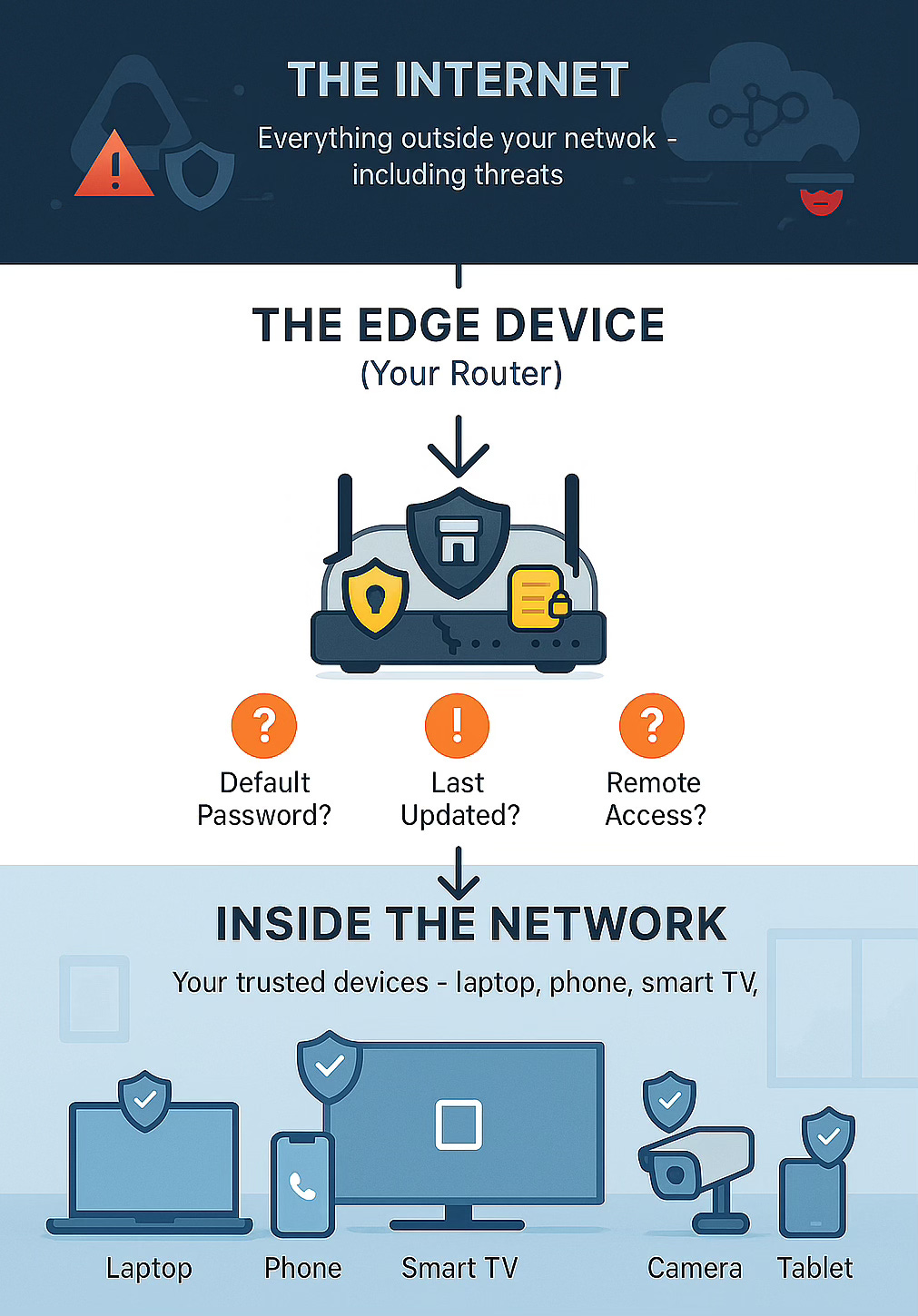
An edge device sits at the “edge” of your network—the boundary between your internal devices and the internet.
Think of your network like a gated community:
Outside: The internet
The gate: Your router (This is your edge device)
Inside: Your laptop, phone, smart TV, cameras
Your router is the security guard, gate mechanism, and logbook all in one. It decides what comes in, what goes out, and logs everything.
You’re using edge devices right now:
Cable modem/router from your ISP
Home WiFi router
Company VPN box
Smart thermostat
The problem? Most run embedded an Linux Operating System (OS), ship with default passwords, have remote management enabled, and haven’t been updated since installation.
Why This Matters
Your edge device isn’t just a target, it’s a weapon waiting to be recruited.
Once compromised, your router becomes part of an attacker’s infrastructure. Attackers could be running DDoS traffic, spam campaigns, or credential stuffing attacks through your network right now, and you’d never know. Your Netflix still works. Your video calls are fine. But your router is quietly working for someone else in the background.
AISURU, the botnet we talked about earlier now rents out access to compromised routers as “residential proxy services.” Criminals pay to route their attacks through your device to hide their location.
Other attack groups use the same technique:
Volt Typhoon (2023-present): Chinese state-sponsored campaign targeting edge devices in U.S. telecom, energy, water, and transportation sectors. Not attacking now—pre-positioning access for future operations.
BRICKSTORM (Early 2025 - present): Chinese state-sponsored campaign targeting edge devices in U.S. Law Firms and Software-as-a-Service (SaaS) companies. This group is active right now and is very advanced. (See Google’s excellent writeup here. More to come on this in Thursday’s Intruvent Edge.)
The pattern is consistent: compromise edge devices running default settings, build botnets, then either launch attacks or rent access to other criminals. Your router with “admin/admin” is exactly what they’re looking for.
What You Can Do Right Now
A quick note: These steps involve accessing your home router’s settings. If you’re not comfortable doing this yourself, that’s completely okay. Ask a tech-savvy friend, family member, or IT professional for help. There’s no shame in getting assistance when it comes to your network security.
For detailed step-by-step instructions on all of these, visit RouterSecurity.org. They have comprehensive guides for every router model.
1. Change Your Default Admin Password
“admin/admin” or “admin/password” works on millions of devices. Change it to a 16+ character unique password and store it in a password manager.
2. Enable Automatic Firmware Updates
Router firmware patches security vulnerabilities. AISURU exploited the firmware update mechanism by compromising Totolink’s update server, but routers without updates are even more vulnerable. Enable automatic updates if available, or set a quarterly calendar reminder.
3. Disable Remote Management
Unless you’re actively using it, turn it off. This is how attackers find vulnerable routers by scanning for exposed management interfaces.
4. Review Connected Devices
Botnet operators add fake “devices” that look legitimate but are actually command-and-control relays. Check your device list regularly. Unknown device? Change your WiFi password to force everything to reconnect.
5. Replace Old Routers
If your router is 5+ years old OR the manufacturer stopped updates, consider upgrading. Look for routers with automatic firmware updates, WPA3 encryption, and active manufacturer support.
Advanced: Network Segmentation with VLANs
Once you’ve secured the basics, VLANs (Virtual LANs) let you create isolated networks within your network:
IoT devices: Separate VLAN so compromised cameras can’t reach your laptop
Work devices: Keep work laptop isolated from personal devices
Guest network: Internet access without seeing your internal devices
Requires: VLAN-capable router, managed switch, VLAN-aware access points
Learn more from these solid sources:
Explainer - Internet of Things (IoT): IoT stands for “Internet of Things” - devices that connect to the internet but aren’t traditional computers, phones, or networking equipment like routers. Your smart doorbell, security cameras, thermostat, light bulbs, refrigerator, baby monitor, or voice assistant are all IoT devices. They’re convenient because you can control them from anywhere, but they’re also security risks. Most ship with weak default passwords, rarely get security updates, and manufacturers prioritize features over security. Once compromised, they become perfect botnet recruits because they’re always on, rarely monitored, and nobody thinks to patch a light bulb.The Bottom Line
AISURU didn’t need zero-days to build a 400,000-device botnet. They compromised a firmware update server and waited. Volt Typhoon doesn’t need novel techniques. They just need devices running default settings.
Three rules (15 minutes to implement):
Router password = bank account password strength
Enable auto-updates or check quarterly
Remote management OFF
Share these with friends and family today. The 15 minutes you spend could prevent your home from becoming part of the next record-breaking attack.
Thursday: If you are in the Legal field or work in SaaS you need to take quick action. BrickStorm is a new APT group that is targeting US based law firms and tech companies with advanced attack techniques. In Intruvent Edge, we’ll examine what they are doing and how you (or your IT) can protect against their attacks.
If you like this newsletter: Forward it to your friends and have them sign up!  Spread the word.  Previous editions available at https://edge.intruvent.com

Thanks for reading!