

Prevent This: Don't Get "Quished" - QR Code Phishing
How to Spot Fake QR Codes Before They Steal Your Data

What Happened?
They are turning up everywhere. Those small cryptic square QR codes are showing up at the places where we live, work or shop. Now, cybercriminals have turned innocent QR codes into their latest weapon. Quishing (QR code + phishing) attacks have exploded. According to Cofense, QR code phishing campaigns increased 331% year-over-year. More than 26 million Americans have been directed to malicious sites through QR codes, per NordVPN research.
The attacks work through emails pretending to be from Microsoft, DocuSign, or HR, plus physical fake QR stickers placed over real ones on parking meters, restaurant tables, and utility bills. Research shows 73% of Americans scan QR codes without verification, and executives face 42 times more attacks than regular employees.
Why Should You Care?
Your email security likely cannot catch these attacks. QR codes are images, so most email filters cannot read what is inside them. When you scan with your phone, you bypass corporate security controls.
Critical statistics:
26% of all malicious links are now sent via QR code (KeepNet Labs)
Only 36% of recipients accurately identify QR phishing attacks
Average business loss from quishing exceeds $1 million per incident
89.3% of QR attacks aim to steal login credentials
According to Rob Lee, chief of research at SANS Institute: “QR codes were not built with security in mind, they were built to make life easier, which also makes them perfect for scammers.”
Real-world incidents:
The FTC has issued warnings about packages being delivered with malicious QR codes
The NYC Department of Transportation has warned about fake QR codes on parking meters (set up to capture payment information)
Nation-state intelligence agencies are using QR codes to compromise military personnel accounts
Attackers are becoming more sophisticated, using “split QR codes” to evade email filters and redirecting through legitimate services like SharePoint before sending victims to phishing sites.
How Quishing Works
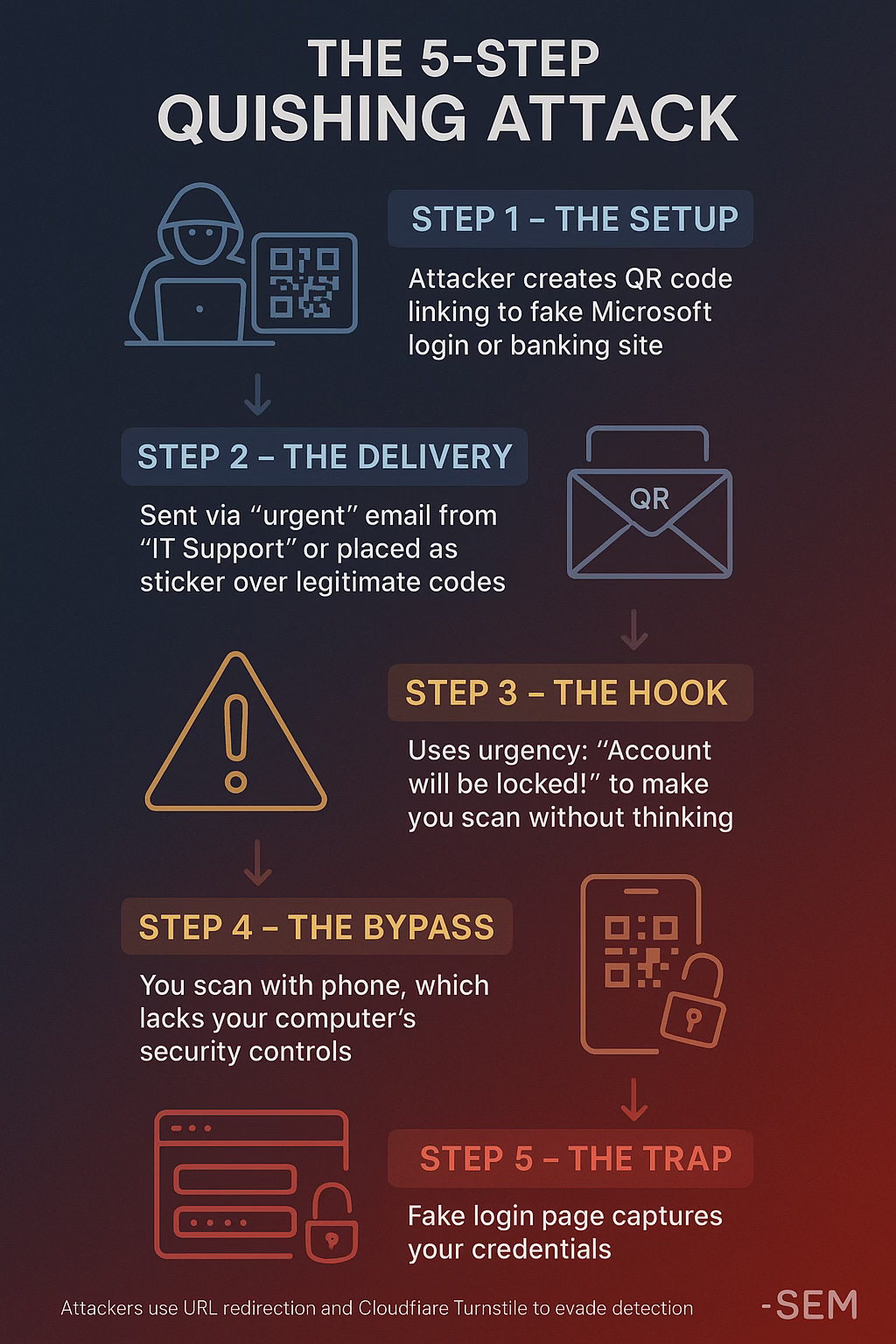
The Five-Step Attack:
The Setup: Attacker creates a QR code linking to a fake Microsoft login page or banking site
The Delivery: Sent via “urgent” email from “IT Support” or placed as a sticker over legitimate codes
The Hook: Uses urgency (”Account will be locked!”) to make you scan without thinking
The Bypass: You scan with your phone, which lacks your computer’s security controls
The Trap: Fake login page captures your credentials
Attackers use URL redirection and services like Cloudflare Turnstile to evade detection, sometimes redirecting through legitimate services like SharePoint first.
What Can You Do About It?
The Golden Rule: Do I Really Need to Click that URL?
Modern phones show you a URL (Uniform Resource Locator; or web address) preview when scanning QR codes. When you scan with your iPhone Camera app, a notification banner displays the URL at the top of your screen. Check it before tapping. Tink long and hard on if you even need to click on that URL.
Red Flags:
Suspicious domains (mic2rosoft.com instead of microsoft.com)
Long, complex URLs with random characters
URL shorteners from unknown sources
URLs that do not match the sender
IP addresses instead of domain names
Safe Scanning Practices:
In Emails:
Never scan QR codes from unexpected emails
Verify directly through bookmarked URLs or apps, not the QR code
Watch for PDF attachments with QR codes (new evasion tactic)
In Physical Locations:
Check for stickers over existing codes—peel them back
Look for crooked, poorly aligned, or freshly applied stickers
Ask staff to verify payment QR codes
Request physical menus if suspicious
General Safety:
Use native camera apps (have built-in protections)
Enable 2FA everywhere (backup if credentials stolen)
Use password managers (won’t auto-fill on fake sites)
Never enter sensitive info immediately after scanning
iPhone Quick Guide:
Open Camera app
Point at QR code
Wait when notification appears
Read the URL carefully
Verify it matches expectations
Only tap if legitimate
Safe QR Code Generators
If you need to create QR codes for business, use trusted generators:
Adobe Express (Free, best for most users): No expiration, no sign-up, customizable. https://www.adobe.com/express/feature/image/qr-code-generator
Uniqode (Enterprise): SOC 2, GDPR, HIPAA compliant. Password-protected codes, analytics. Paid plans from $5/month.
https://www.uniqode.com
QRCode Monkey (Free with customization): High-resolution, logo integration. Static codes only.
https://www.qrcode-monkey.com
Avoid: Unknown websites, generators requiring extensive permissions, sites with no privacy policy, or those injecting ads into codes.
The Bottom Line
QR codes are everywhere and convenient, but that convenience comes with risk. The habit of previewing the URL before tapping can save you from credential theft, financial loss, and major security breaches.
Remember:
Pause before scanning any QR code
Think: “Do I Really Need to Click on this URL?”
Preview the URL when it appears
Verify it matches what you expect
Never scan codes from unexpected emails or suspicious locations
Real-World Examples
Parking Meter Scam (Austin, TX): Criminals placed fake QR stickers over legitimate parking payment codes. FBI issued nationwide warnings. Victims entered credit card information on phishing sites.
HR Email Attack: Employees received urgent emails with QR codes to “review salary adjustments.” 56% of quishing emails involve Microsoft 2FA resets. The codes led to fake login pages capturing credentials.
Additional Resources:
Federal Trade Commission QR Code Warning: https://consumer.ftc.gov/consumer-alerts/2024/01/scammers-hide-harmful-links-qr-codes-steal-your-information
CISA QR Code Security Tips: Check cisa.gov for latest guidance
Report Scams: If you’ve been targeted, report to the FTC at reportfraud.ftc.gov
Research Sources: Cofense Threat Intelligence, Barracuda Networks, Palo Alto Networks Unit 42, KeepNet Labs, NordVPN Security Research, Abnormal Security, Egress Phishing Threat Trends Report, FBI Internet Crime Complaint Center
Last Updated: October 6, 2025
Got questions about cyber security for your organization? Need help planning and implementing your cybersecurity strategy? Reach out to the Intruvent team… we’re here to help keep your business secure!