

Prevent This: Approving Your Own Compromise
How Iranian APT groups steal sessions after you approve the login. And what actually stops them.

What Happened?
Last week, we published Threat Actor Profiles (TAPs) and Threat Hunting Guides (THGs) for Iran’s most dangerous cyber operators and the escalating threat they pose to Western organizations. If you haven’t seen them yet, our Iran Cyber Threat Intelligence Center is the go-to resource for tracking every active Iranian threat group, complete with detection rules, hunting queries, and tactical guidance. Go check it out.
One technique kept showing up across almost every group we profiled: bypassing multi-factor authentication.
Not breaking it. Not cracking it. Bypassing it entirely.
Here’s how it works. You get an email that looks like it came from Microsoft or Google. The login page looks real. The URL looks close enough. You type your password, get the MFA prompt on your phone, and approve it. You did everything right. You followed the training. You used MFA.
And the attacker now has your session.
The page you logged into was running through a reverse proxy: a server sitting invisibly between you and the real Microsoft login. When you completed your MFA challenge, the proxy captured the session token that Microsoft issued after your successful authentication. The attacker takes that token, loads it into their own browser, and they’re in. Microsoft thinks they’re you. MFA never fires again because the token says authentication already happened.
This isn’t theoretical. This is the primary access technique for multiple Iranian state-sponsored groups operating right now.
Why Should You Care?
Because MFA has become the security equivalent of “I eat healthy” while surviving on protein bars and Diet Coke. It feels like you’re covered. The checkbox is checked. And for years, that was good enough.
It’s not good enough anymore.
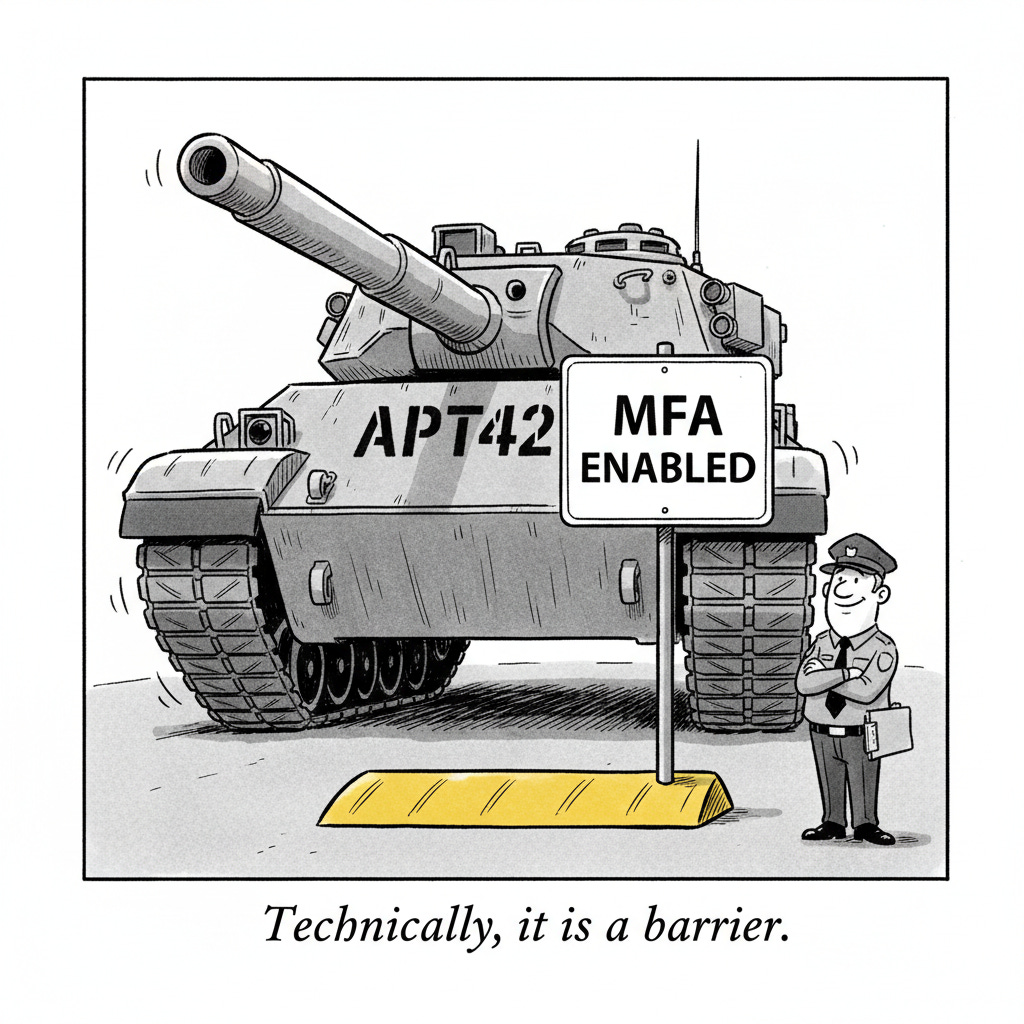
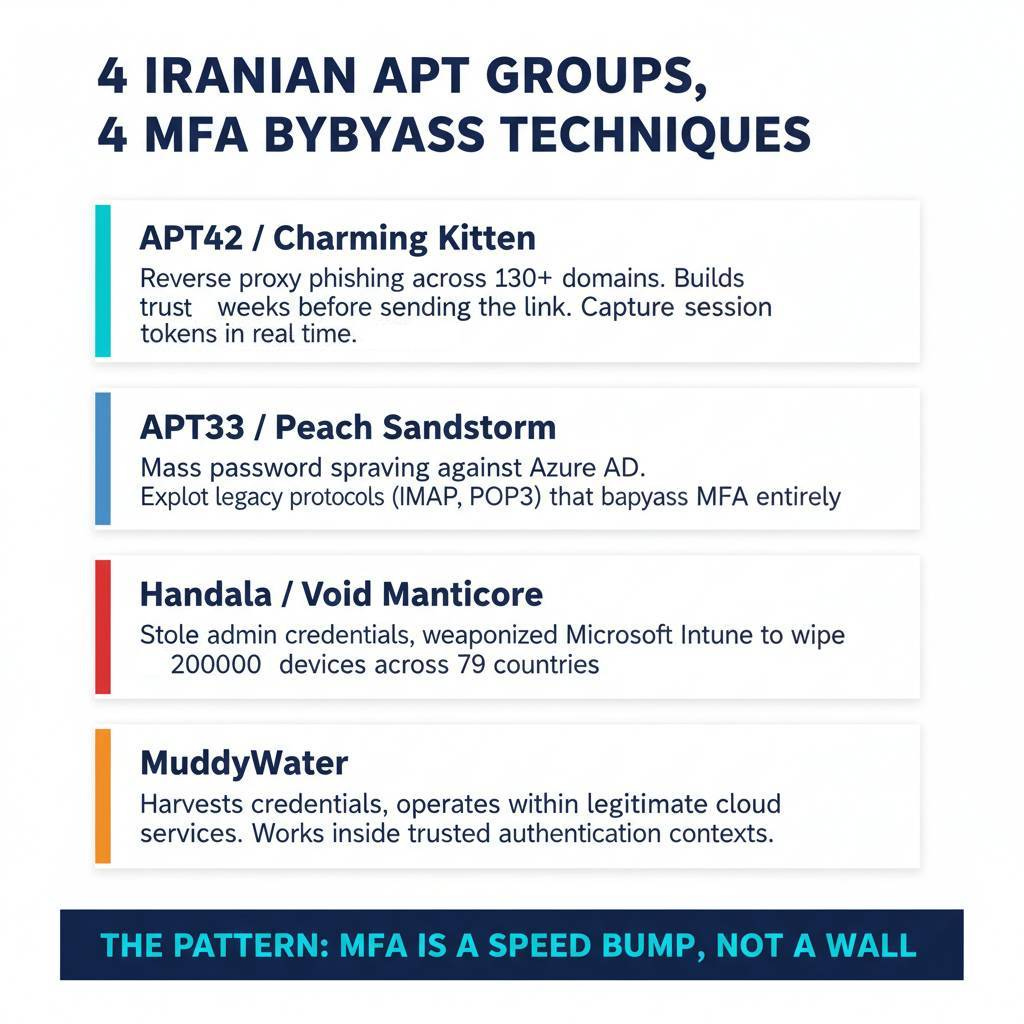
APT42, the IRGC Intelligence Organization’s dedicated credential harvesting unit (also tracked as Charming Kitten and Mint Sandstorm), has built an industrial-scale phishing operation specifically designed to defeat MFA. Check Point Research documented over 130 phishing domains operated by the group, many running custom React-based phishing kits that intercept MFA tokens in real time. Their targets include journalists, academics, policy researchers, government officials, and cybersecurity professionals. They build trust over weeks of correspondence before sending the malicious link. By the time the phishing page loads, the victim has every reason to believe the interaction is legitimate.
APT33 (Peach Sandstorm) takes a different approach to the same problem. Rather than sophisticated phishing proxies, they run massive password spraying campaigns against Azure AD and Microsoft 365 environments. The technique is blunt but effective: try common passwords across thousands of accounts. When they find one that works, they look for ways around MFA. Legacy authentication protocols like IMAP, POP3, and SMTP AUTH don’t support MFA at all. If your organization hasn’t explicitly blocked these protocols, an attacker with a valid password can walk right past your MFA controls using a protocol from 1996.
Then there’s the Stryker attack. Two weeks ago, Handala (a front for Iran’s MOIS destructive operations unit, Void Manticore) compromised a Stryker Corporation admin account and used Microsoft Intune to remotely wipe 200,000 devices across 79 countries. MFA was in place. It didn’t prevent the initial credential theft from being leveraged into catastrophic admin abuse. Once the attackers had a single valid session with administrative privileges, every device enrolled in the management platform became a target.
MuddyWater rounds out the picture. Iran’s MOIS-affiliated group harvests credentials and then operates entirely within legitimate cloud services for command and control. They don’t need to bypass your MFA repeatedly because they’re working within trusted authentication contexts, using your own cloud infrastructure against you.
The pattern across all four groups is the same: MFA is a speed bump, not a wall.
How Does This Actually Work?
The tool that makes this possible is called Evilginx. Originally built as a penetration testing tool, it’s an open-source reverse proxy framework that sits between a victim and a legitimate login page. The attacker sets up a server, registers a domain that looks similar to the real one, and configures Evilginx to proxy traffic to the actual Microsoft or Google login.
When you visit the phishing page, Evilginx forwards your request to the real login server. You see the real login page, rendered through the proxy. You enter your password. The real server sends back an MFA challenge. You approve it on your phone. The real server issues a session token. Evilginx captures that token before passing the authenticated page back to you.
You see a successful login. The attacker sees your session token.
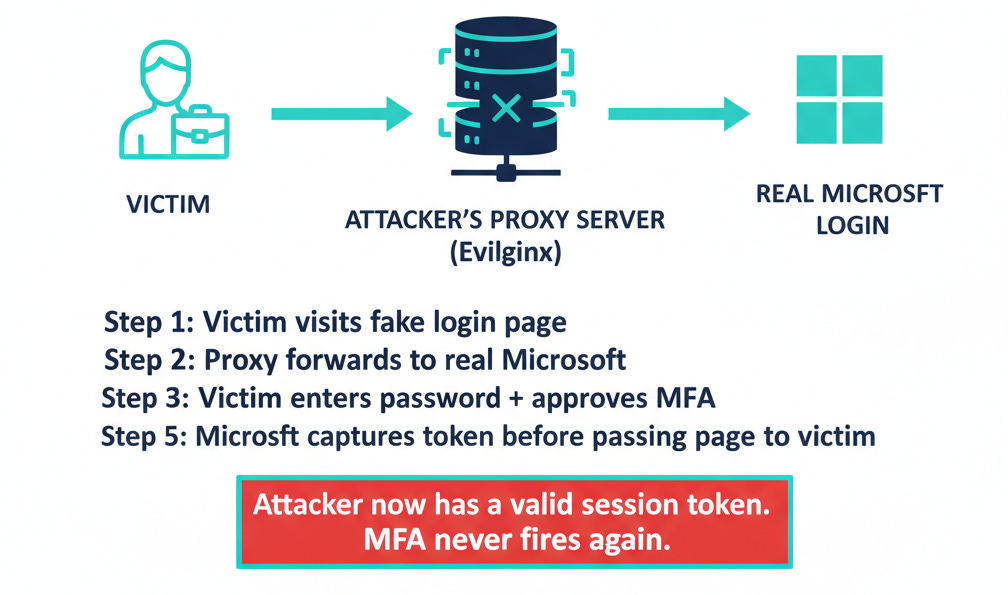
From there, the attacker loads your stolen token into their own browser. To Microsoft’s servers, the request looks identical to yours: same token, valid authentication, MFA already completed. The attacker can now read your email, access your files, and move laterally through your organization. Unless someone notices that your account is suddenly being accessed from two different countries at the same time, there’s no alert.
The commercial ecosystem around this technique has matured rapidly. Phishing-as-a-Service platforms like Tycoon 2FA, Sneaky2FA, and Flowerstorm sell ready-made kits that handle the entire reverse proxy setup. No technical expertise required. Push Security’s 2025 analysis found that MFA bypass is now standard fare in the criminal phishing marketplace, and that roughly one in three phishing attacks they detected were delivered outside of email entirely, through LinkedIn messages, Google search results, and other channels that email security tools never see.
Token theft accounted for 31% of Microsoft 365 breaches in 2025, making it the leading attack vector ahead of traditional credential compromise. Microsoft documented over 382,000 MFA fatigue attacks in a single year, with research showing that 1% of users blindly accept the first push notification they receive.
One percent sounds small until you calculate it across an organization with 10,000 employees.
What Can You Do?
For Everyone:
Stop approving MFA prompts you didn’t initiate. This is the single most important takeaway from this entire article. If your phone buzzes with a login approval request and you aren’t actively logging into something, deny it. Every time. That unexpected prompt could be an attacker who already has your password, waiting for you to tap “Approve” so they can walk into your account.
Use a password manager. A good password manager auto-fills credentials only on the exact domain they were saved for. If you land on a phishing page at “micros0ft-login.com” instead of “microsoft.com,” your password manager will refuse to fill in your credentials. That moment of friction could save your organization.
For IT and Security Teams:
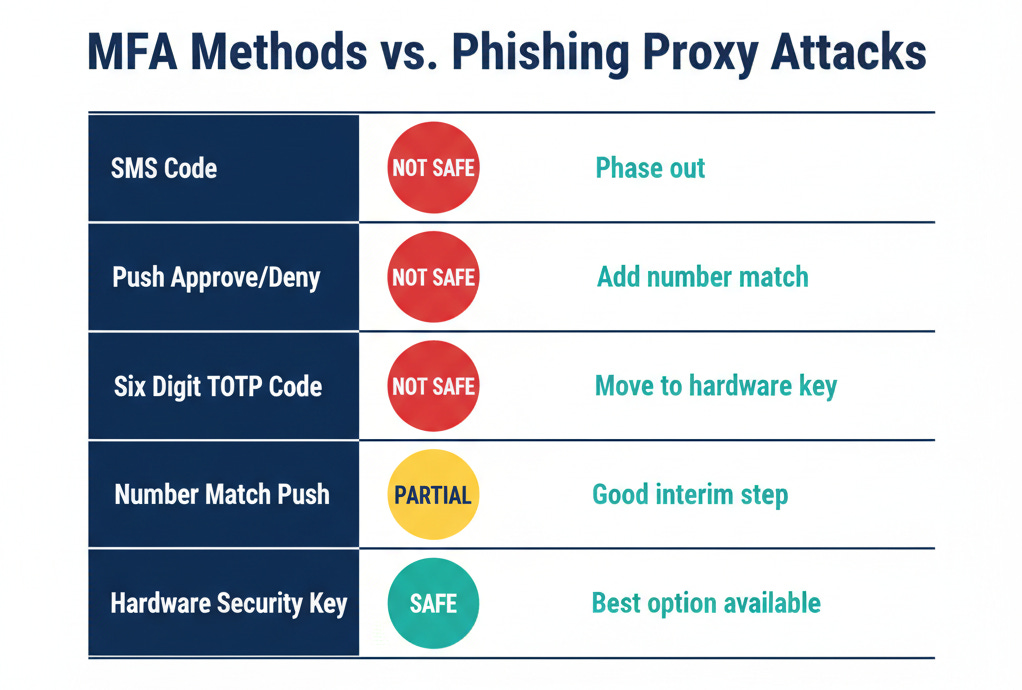
Deploy phishing-resistant MFA. Hardware security keys (FIDO2/WebAuthn) and passkeys defeat reverse proxy attacks entirely because the authentication is cryptographically bound to the legitimate domain. The key literally cannot produce a valid response for a phishing site because the domain doesn’t match. Google deployed hardware security keys to all 85,000+ employees and reported zero successful phishing attacks afterward. Cloudflare survived a sophisticated phishing campaign that compromised other tech companies because their hardware keys refused to authenticate on the phishing domain, even after employees clicked the malicious links and entered their credentials.
Adoption of phishing-resistant authenticators grew 63% in 2024, according to Okta’s research. CISA calls FIDO2 and PKI-based authentication the gold standard. Multiple countries are now mandating the retirement of SMS-based authentication. The technology is mature and the deployment playbooks are proven.
Block legacy authentication protocols. If IMAP, POP3, SMTP AUTH, and other legacy protocols are still enabled in your Microsoft 365 or Entra ID environment, you have a backdoor that bypasses MFA entirely. Create Conditional Access policies that block legacy authentication. Start in report-only mode to identify any legitimate usage, then enforce. This single change eliminates the attack vector that APT33 and dozens of other groups exploit through password spraying.
Implement Conditional Access policies with teeth. Require compliant devices for access to sensitive resources. Restrict authentication to managed devices and known network locations for administrative accounts. Require step-up authentication for high-risk actions. These policies create layers of verification that survive a stolen session token.
Monitor for token replay. When an attacker steals a session token, there’s a window where two different sessions using the same token are active from different IP addresses and user agents. Enable Continuous Access Evaluation in Entra ID, which can detect and revoke tokens when conditions change. Watch for impossible travel patterns. Alert on sessions where the user agent or IP address changes mid-session.
Shorten token lifetimes for sensitive accounts. The shorter the session token validity, the smaller the window an attacker has to exploit a stolen token. This creates friction for legitimate users, so apply it selectively to high-privilege accounts where the security tradeoff is worth it.
For Security Leaders:
Audit your MFA deployment honestly. Check which accounts still use SMS-based MFA. Identify where legacy protocols remain enabled. Find the administrative accounts that have permanently assigned privileges rather than just-in-time access. The Stryker attack demonstrated what happens when a single admin account with broad permissions gets compromised. Least privilege and just-in-time access aren’t theoretical best practices. They’re the difference between a compromised account and a compromised enterprise.
The Bottom Line
MFA still matters. Having MFA enabled is dramatically better than not having it. The vast majority of credential attacks still fail against accounts with any form of MFA enabled.
But “I have MFA” has become the new “I have antivirus.” It’s a starting point, not a finish line. The Iranian groups we profiled on our Iran Cyber Threat Intelligence Center have built entire operational playbooks around the assumption that their targets use MFA. Their attacks are designed from the ground up to defeat it.
The fix exists. Hardware security keys and passkeys are cryptographically immune to these attacks. Blocking legacy protocols closes the password-spraying backdoor. Conditional Access policies and token monitoring catch what gets through. None of this is exotic or experimental. It’s available today, from the vendors you already use.
The question isn’t whether your MFA can be bypassed. It can. The question is whether you’ve deployed the controls that make bypass meaningless.
Next time you get an unexpected MFA prompt on your phone, remember: that approval button might be the most dangerous click you make all year. Deny it. Call your IT team.
Research Sources: Intruvent CTI Cloud, Google Cloud/Mandiant APT42 Research, Check Point Research, Microsoft Threat Intelligence, Cisco Talos, Push Security 2025 Phishing Trends Report, Okta Secure Sign-in Trends Report 2025, Obsidian Security, CISA Phishing-Resistant MFA Guidance, Malwarebytes, Infoblox
For the complete Iranian threat actor profiles, detection queries, and hunting guides, visit the Iran Cyber Threat Intelligence Center.
Last Updated: March 24, 2026
Want sector specific threat intelligence for your organization? Check out our BRACE CTI platform at https://intruvent.com/brace